




Product correlation report: products sold together
See which products are most often sold on the same receipt as a given product, and plan promotions and shelf layout around it.
The product correlation report lists the products that are sold together on the same receipt as a product you choose. For example, you see which other products customers who buy simit buy most often, and plan your shelf layout and promotions such as “this one is discounted with it” around that.
Open the report
Open Reports › Product Correlation Report. This report opens only on the main account (business owner login).
Choose the product and the range
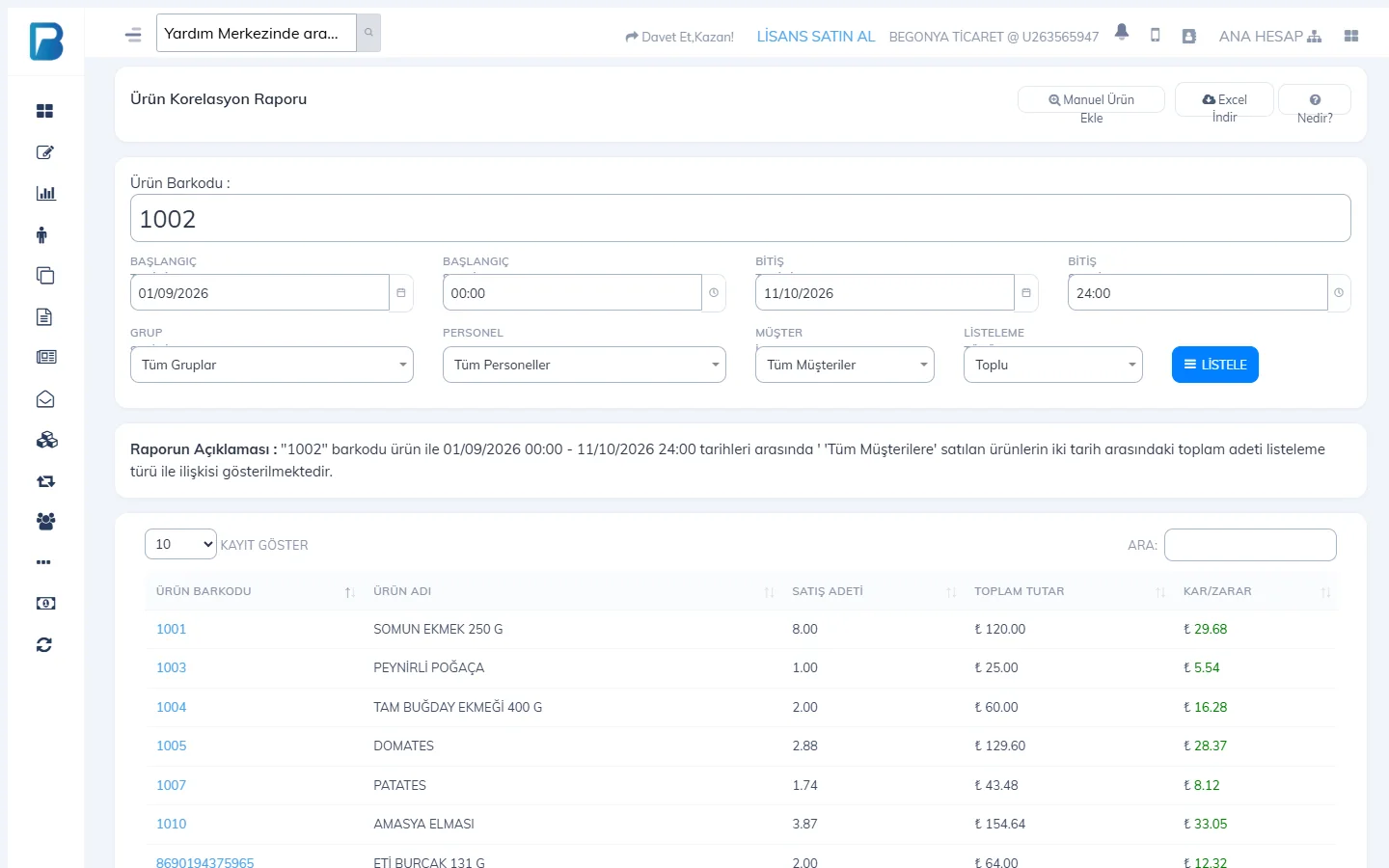
1 Enter the product's barcode in Product Barcode (if you do not know the barcode, search by name with Find Product by Name at the top). Choose the start / end date and time; if you want, set the group, staff, customer and Listing Type (Combined or Day by Day). Enter in the barcode box does not submit the form; click 2 LIST.
Read the result
3 The table shows the quantity sold, total amount and profit / loss of each product sold on the same receipt as the product you chose; the products most often sold together are at the top. Clicking a product barcode opens the product card. You can download the table with Download Excel.
 1234
1234
Cancelled sales and receipts with the “No effect” payment type are not included in the report. Profit is calculated only for products with a purchase price entered. The 4 What is this? button explains the report with an example.