




Customer account summary (by date range)
Opening balance, on-account sales, returns, payments and closing balance for all customers between the dates you choose; with Excel and printing.
The Account summary lists all your customers for two dates you choose: each customer's opening balance, their on-account sales, returns and payments in those dates, and their closing balance. Use it to get an end-of-month debt list, give a list to your accountant, or see who paid how much in a period. The report only displays data; it changes no records.
Opening the report
Press the Account summary button at the top of the Customers page.
Choosing the dates
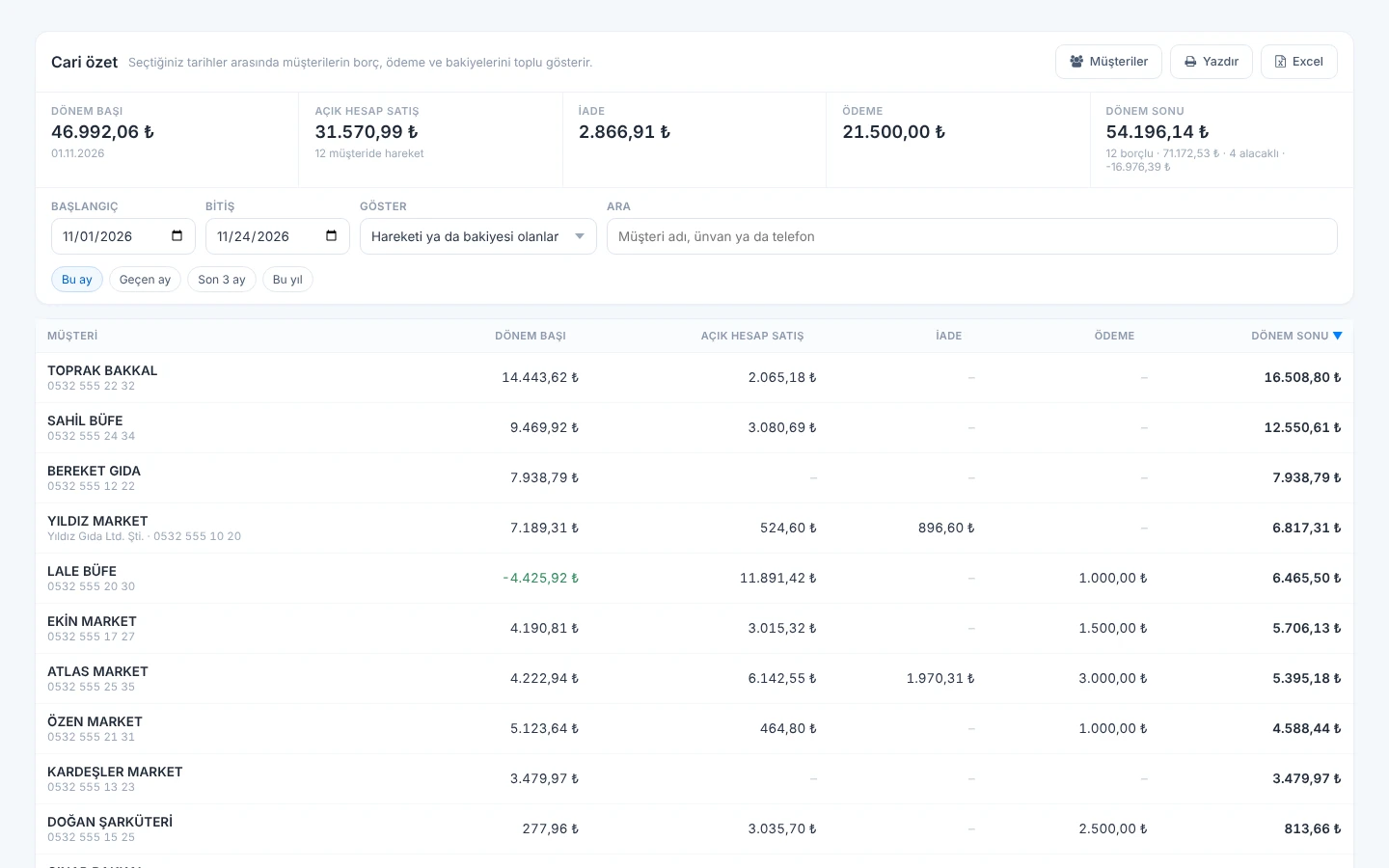
1 Choose the Start and End dates, or click This month, Last month, Last 3 months or This year. When the page first opens, it shows the start of this month to today.
 12345
Reading the report
- 2 The boxes at the top are the totals for the customers in the list: Opening balance, On-account sales, Return, Payment and Closing balance. Under the closing balance you see how many customers owe you and how many are in credit.
- Opening balance is on-account sales − payments before the start date. Closing balance = Opening balance + On-account sales − Returns − Payments.
- A positive balance is what the customer owes you; a negative (green) balance is the customer's credit (overpayment).
- If the end date is today, the closing balance is the same as the outstanding balance in the Customers list.
Filtering and exporting
3 Use Show to list With activity or a balance (the first option), With activity in these dates, Owing at the end of the period or In credit at the end of the period. If you have customer groups, a Group selection appears next to it; search by name, title or phone.
4 Click a column heading to sort. Click a customer to open their card with the same dates in a new tab; there you see each sale and payment and can print or send a statement.
5 Download the list with Excel or print it on A4 with Print; filters and sorting carry over. The Excel file also has the phone number and the dates of the last on-account sale and last payment.
Customers with no activity and no balance are not listed. For one customer's detailed statement, use the date range on the customer card.